We just revealed a new character, Nym, the Nanite Manipulator! I just finished her rig a few minutes ago so hopefully we'll be showing that off some time soon.

Wednesday, March 21, 2012
Under NDA
Greetings! I just wanted to do a quick update. I have still been doing work but I can't release it on my personal portfolio. If you'd like to see what I've been working on, head on over to http://trenchgames.com/ to see what I've been up to.

Thursday, January 26, 2012
Rigging Reel 2011
Put together some of my work for your enjoyment. So here it is!
Rigging Reel 2011 from Chris Camacho on Vimeo.
Wednesday, January 25, 2012
School and such
Been a while since I last posted an update and I just wanted to keep my blog alive. This spring is my last semester as a graduate student at the University of Texas at Dallas. As part of my graduate project, I am working on an animated short, that you can find here http://cabinfevershort.blogspot.com/ and I'm having to teach myself animation, as we lack animators for the project.
It's coming along very well! In fact I'm looking forward to posting some of the shots I personally worked on. I'm very proud of the work I've been doing for this short and I want to share it on my portfolio, but I want it to be perfect. So I'm still around, just working incredibly hard to finish my degree. I'm hoping to have something posted within the next week!
It's coming along very well! In fact I'm looking forward to posting some of the shots I personally worked on. I'm very proud of the work I've been doing for this short and I want to share it on my portfolio, but I want it to be perfect. So I'm still around, just working incredibly hard to finish my degree. I'm hoping to have something posted within the next week!
Sunday, December 4, 2011
Drop pod - Rigid Body Animation
For this animation, I used rigid bodies for the top and doors of the drop pod. The whole animation has the pod landing, and the doors bursting open. This was built for use in the UDK engine, but I can't show in game footage due to other circumstances.
Star Face's dynamic tentacles
Star Face's tentacles are looking pretty shnazzy! I used Maya hair to create the dynamics for his tentacles. Adjusted the stiffness if the hair follicles and added in sphere colliders for his chest. Makes his bottom tentacles slide across his body.
Tuesday, November 1, 2011
Rigging Philosophies: Joint naming conventions
This a new post to kick-start a new section of my blog. I was recently asked what were some of my "beliefs" when it comes to rigging. Basically how I think rigs should be made and how they should function. This will be a nice way to really start analyzing why I do things the way I do them. So let's get started.
When it comes to naming joints, some might think that naming them anatomically would be an ideal naming convention. Keeps things organized and you know exactly what that bone's function is. So why is this a problem? By default, Maya likes to organize deformers in the component editor alphabetically. This can be a problem when you start having clavicles, shoulders, and elbows. They can be misplaced within the component editor and make it difficult to see point weights side by side. Yes, you can filter out the zero'd channels but what happens when you give points a full weight of 1? going back and searching for it's neighboring deformers can become a pain! So here is my simple solution: Use numbers!
Let's use an arm for an example, starting from the clavicle: Instead of starting out with bind_L_clavicle01 lets go with bind_L_Arm001. From there we start getting our arm, starting from 001, 002, 003, and so on. With this naming convention, you know that it's on the left side arm, and that it's going to have geometry bound to it. Best part about this, in the component editor, all of your arm joints are side by side, making it incredibly easier to read and sort through.
So you might be asking yourself "This is great and all, but what about fingers?" I simply start with the thumb carpals and begin naming them like so: bind_L_D1_001, bind_L_D1_002, and so forth. With this naming convention, I know that it is a digit on the left side, and D1 means that it is the thumb. Now this does require a bit of mind training as you always start from the thumb and fan out from there. Once again, this is great because now all my fingers are all clumped together and easy to find.
I have found this naming convention to help me be a more efficient weight painter as well as making it easily readable for someone down the line. Now I only use this convention for deformers and joints in general. For controls I use a more anatomical approach as it makes more sense for an animator. Controls are also the representation for that area of the body and should be named as such, where as a deformer is part of the underlying framework of a rig.
Sunday, October 23, 2011
New Character Rig: Nym
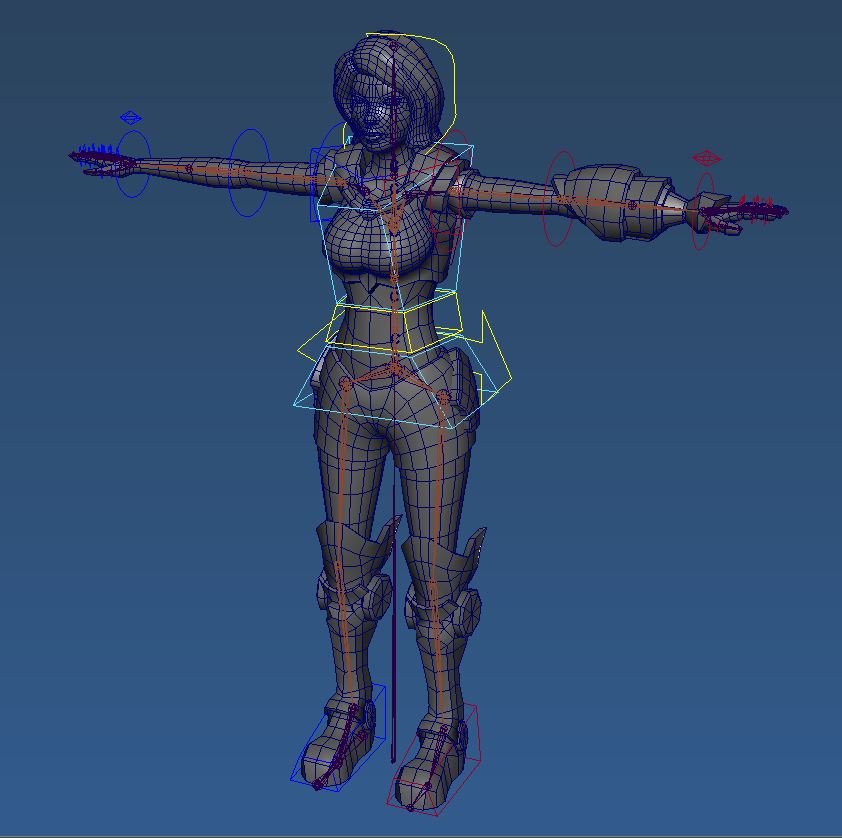
Started, and almost finished, a new rig today for a project I've been working on with some friends of mine. She still needs a few tweaks but she is pretty close to being finished. Here she is in a bit of a pose to show off the rig a little better. She'll be in my next demo reel.

Subscribe to:
Posts (Atom)